Posts

Showing posts from March, 2009

Pick of the Week: Audience Engagement Should Add Value

Audience engagement is essential in any presentation. In my earlier posts ( Feb 5 & Feb 7 ) I had talked in detail about what do we mean by engagement and how to engage the audience. But should you engage the audience just for the heck of it? Meaningless engagement will not add any value to your presentation or the audience. Olivia Mithcell's March 25 post talks about getting the maximum value from audience engagement. Here is a summary of the main points in her post: 1. Audience will not start to engage unless they have built a comfort level with you and have started trusting you. 2. Involve the audience only where it will add value to them and to the presentation . 3. Do not single out your audience and ask questions. It might put them in an awkward situation. You can make them talk in pairs (to each other). 4. Prepare beforehand the questions you will ask in the presentation. Do your homework on where you want to engage the audience with which question. 5. Give clear i...

Do I really need Slide Transitions?

Image
I have seen people use all kinds of slide transitions to keep the audience interested. From simple effects like 'Fade Smoothly' to crazy effects like 'Dissolve' and 'Strips'. They come from right, they come from left, they come from all over the place. MS PowerPoint 2007 has 49 kinds of transition effects. You can also tweak the transition speed (slow/medium/fast). My question to you is: Do you really need to worry about slide transitions? What do you do when you make presentations? How often do you use transition effects? Do you experiment with multiple effects in the same presentation or stick to one? Think for a while before you read on... I have a simple advice to offer: "If you are making a formal presentation, then: 1. You need not worry about slide transitions 2. If you want to then apply 'Fade Smoothly' to all slides and forget about it." Spending anything more than 2 seconds worrying about slide transitions is a waste of time. Slide tr...

Royalty Free Music for Presentations

While searching for royalty free music on the web I chanced upon a very good resource. It is a website by Kevin MacLeod. It has a large collection of music (compositions, not songs) created by Kevin. And it's royalty free. You just need to credit the composer in your presentation. All that Kevin actually asks for is a $5 voluntary donation, if you have used his composition. The website allows you to search music by 'feel' and 'genre'. I found the search by 'feel' very useful. I was searching for a peppy & lively score and I got exactly what I needed when searching under the categories 'bouncy' and 'bright'. Explore the website and get what you are looking for. Another interesting feature is that you can listen to a preview before downloading the entire song. Saved a lot of valuable time for me. If you ever need a background score, try this website. Read the complete terms of use here & here . You can also get something called ...

Reducing the file size of your presentation

Image
www.freedigitalphotos.net What do you do when you end up with a bulky presentation and want to reduce its size? In this post I will share one technique which will drastically reduce the file size of your presentation. Generally we dont worry about the file size because we can present from our laptop or transfer it to some other system using a USB drive. But if you email a presentation you will have to worry about reducing the file size of your presentation. So here is my simple technique. Reduce the size of the high resolution images you use in your presentation. Typically these images are large and hence take up more space. By reducing the size of these images, we can reduce the size of the ppt. How do we do that? Copy the image (Ctrl+C) Delete it Paste Special as 'Picture (JPEG)' Do it for all high resolution images Save the file Check the file size and be surprised! By how much will the file size reduce? A lot. As a test, I created a small two slide presentation with images ...

Pick of the Week: Why do you need Handouts?

Most people who present do so without giving any handouts to the audience. Some who do just take print outs of the slides they present. Are handouts just a copy paste of your slides? I don't think so. Handouts are an effective medium through which you can share the key points of your presentation. Prepare it as a one or two page word doc and hand it over after your presentation is over. Do not distribute handouts at the start. The audience will not pay attention during the presentation because they already know what you are going to present. Printout of your slides is not a good handout because your presentation is incomplete without your speech. Your presentation is not a standalone thing. But your handout it. Your handout is a summary of what you have just finished presenting. If your audience knows you will give a handout, then instead of writing down stuff, they will actually focus more on what you are saying. In the last ten days I have seen two posts on handouts. Oliver Adri...

SmartArt Graphics in PowerPoint: An Introduction

Image
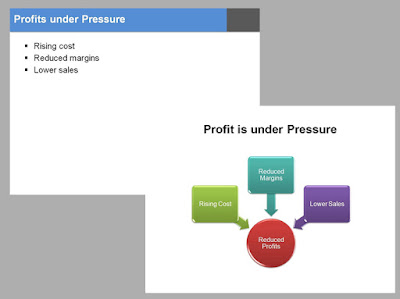
The objective of this post is to introduce SmartArt Graphics to people to who are still shying away from using it or are just unaware of it. In this post, which is by no means exhaustive, I will talk about: 1. What is SmartArt? 2. When should you use SmartArt? 3. What are the types of Smart Art Graphics? 4. What are the various SmartArt styles? SmartArt Graphics is a visual representation of data or information. It is quick and easy to make and jazzes up your presentation like nothing else. It not only enhances the visual appeal of your information but also helps communicate your idea better. SmartArt, however, is not a graph/chart wherein you input data and get a chart as your output. Example Profit in your business unit is under pressure. It has happened because of rising costs, reduced margins and lower sales. You can present it with bullets (as most people do) or by using SmartArt. The profit circle in red and the arrows depicting the cause and effect relationship help co...

How to add hyperlink to Smart Art?

Image
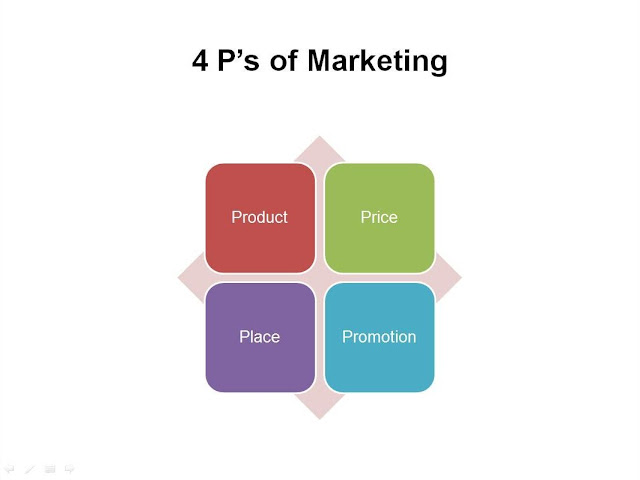
SmartArt is a great feature in PowerPoint 2007. It has enhanced the visual appeal & ease with which we present information (I will share more on using SmartArt later). But there is a small problem with SmartArt. You cannot create a hyperlink with SmartArt. At least I am yet to figure that out :) But there is a way you can bypass the problem. Do you know it already? If not, then can you guess? Let us take a simple example to understand how to add hyperlink to SmartArt. We have a slide on the 4 P's of marketing. You need hyperlinks so that when in slideshow mode, you click on 'Product' you land on the slide which talks about product. Suppose you want to go to Slide No. 8. Here are the simple steps we will use to create the hyperlink: Step 1: On the 4P's slide, insert another shape. A rounded rectangle (matching the shape of the Product box). Place the new shape over the existing one (need not match it perfectly). Step 2: Format the newly placed shape -> White ...

How many slides should your presentation have?

Last week I was working with a client of mine on improving his presentation. When I told him that the presentation might stretch to 40 slides he was anxious. He wanted it to be under 20. Both the versions had the same content but different number of slides. He knew that. Still he wanted it to be under 20. What's happening in this case? By having 40 slides the content per slide will get drastically reduced and that he felt meant being low on content (less text on a slide meant less work done by the manager). He wanted the presentation to be content heavy. Friends this is a mindset issue. Still in most companies in India having more text on the slides means you have done your research and hard work. How do we solve the problem? It wont be solved bottoms-up (by changing the mindset of the lower level managers). It has to be solved top-down. When managers see their top bosses reducing content per slide they will follow suit. So my answer to the question is: There is no correct number o...

How to Make Business Review Presentations?

Image
Meet Mr.V K Chandrasekaran. A remarkable personality who rose from being a medical representative to the post of Vice President of one of India’s biggest pharmaceutical company Dr. Reddy’s. In this interview, we ask Mr. Chandrasekaran ‘How managers can make effective business review presentations?’ Review meetings are never easy. Managers put night outs and prepare extensively before presenting to superiors. Doing a good job in the field and being able to present it are two different skills. How should a manager prepare for these review meetings? What is his superior looking for? Come let’s hear it straight from the horse’s mouth. Q1. What did you, as a superior, expect from these review presentations? Being a business review, my first expectation is with regards to data . I expect data integrity, data accuracy & data familiarity. By data familiarity I mean, you should be thorough with your data. You have crunched it before coming to me. Secondly, I expect the manager to draw s...

Pick of the Week: Should You or Should You Not?

You have just finished making a corporate presentation. Your client praises you and asks you to hand over a soft copy of the presentation. What should you do? If you have never faced this situation before then you definitely will. How can you say no when the client is asking? Actually you should not hand it over if you are not prepared for it. Not so easily. When you face this situation next time ask yourself these questions: 1. Is the presentation going to make sense without your presence when someone else sees it? 2. Are you sure you are not handing over some confidential information about your company? 3. Can your presentation be misinterpreted by people who have not heard you present? In his interesting post M.J. Plebon asks you to be cautious. A presentation (if made like a presentation) cannot stand alone without your presence. So if you expect such a request then you can actually carry a word doc (or pdf) which captures what you want to say properly. If you are not prepared wi...

Sample presentation: 10 lessons in branding

10 Branding Lessons View more presentations from Vivek Singh . (tags: marketing advertising ) I read the book "The 22 Immutable Laws of Branding" a few days back. These are the 10 most important lessons this book offers for brand managers. If you are a brand manager, this presentation will surely help you. If you are not, know how much effort brand managers are making to reach you and influence you.

Know your data before you present

Image
Source:www.freerangestock.com You present some kind of data in almost every presentation. Data can be presented by sales people, it can be a survey result, a finding by a doctor or number crunching by a business analyst. Not to forget bankers who cant live without data. My question then is, How do YOU present data? Yes I am asking you. Pause for a moment and think of the last presentation you made which had data. What did you do? Did you take any extra care? Did you paste the whole excel on the slide? Was the audience able to understand? Did they ask you to explain more by opening your excel sheet? You should be very careful when you present data. Here are a few suggestions that will you: 1. Ensure data accuracy Nothing annoys the audience more than inaccurate data. It leaves a bad taste in their mouth. Last minute mistakes, calculation errors or just the data not adding up. The percentages in the pie chart do not add upto 100%! Take care while presenting data. Spend that extra minute ...

Best of the Month: Februaury '09

All About Presentations has entered its second month. Last month I wrote on lessons from Dr. Stephen Covey's talk (which I attended in Hyderabad). I also wrote on how we can make our presentations stick. On the one hand I introduced a new concept 'User-Controlled Presentations', and on the other I talked about engaging the audiences and tackling nervousness before presentations. Here are the 3 most popular posts from the last month: Feb 1: 7 habits which make Stephen Covey's presentation effective Feb 7: How do you engage the audience? Feb 12: How do you tackle nervousness before presentations? Here is a list of the 3 most popular posts on this blog till date: Jan 30: 10 ideas that will make your sponsorship proposal work? Jan 14: Checklist for presentations (a short and useful list for every presenter) Jan 18: 'Yes We Can' learn from Obama (review of LK Advani's website)