Posts

Showing posts from November, 2012

Best from the Past: November

Image
I have so far written more than 390 posts on this blog and I have been blogging for 3 years and 11 months. There is a lot of useful stuff in the archives which is worth revisiting. Today we will revisit posts from November of earlier years. Wordle: Create free tag clouds In November 2010, I had shared a website where we can get free tag clouds made. We can type in text and create tag clouds. We can also type a URL and it will create a tag cloud for that website. Here is a tag cloud of my blog's home page. You can see that the word presentation and book are most common on the current home page. We can use advanced feature and type in words and along side type in numbers. These numbers will indicate the importance assigned to that number. The bigger the number, the bigger the word in the final tag cloud. Click here to read the complete post and click here to visit Wordle . Why use Wordle? If you want to showcase a lot of names and bring some into limelight, you can...

Master your Presentation in 25 Steps

Image
This is an important post and the goal of this post is ambitious. In this post, I am going to outline the entire process of making a presentation.  This post applies to any presentation made using PowerPoint or any other software. These steps are from the book 'Presentation Zen' by Garr Reynolds . The interpretation is of course mine. To prepare a great presentation, you need to follow the following steps: Step-1 There are three stages of making a presentation. Preparation -> Design -> Delivery. Spend time on each step. Prepare properly before you create slides. Rehearse before you finally deliver your presentation. Step - 2 Challenge the status quo. Before you start working on your next presentation, you need to accept that something is wrong with the way most presentations are made today. They bore people and no one likes to sit through them. Hence you need to change. You will take risks and do something new. You cannot become better than others, by just doing wh...

Why sharing facts is not enough

What do you say when a new slide come up in your presentation. The facts. That's it or something more? "75% of the smart phones in the world run on Android"   or  "India imports more than 50% of its requirement of cooking oil" or "Our product's sales went up 5% last quarter even though the prices were up 15%." You then move on to the next slide and say what's on the next slide. This is incomplete. For every slide you make, you need to look at three things: 1. The Fact 2. What's your point? 3. Why should the audience care? Most of the times points 2 and 3 are obvious to you but not to the audience. After having shared the facts, you need to give the meaning to the audience . What's your point? So what is it that you really want us to know (after having shared the fact). "Our product's sales went up 5% even though the prices were revised upwards 15% means? What is the point you are making? Should we increase prices...

3 Things PowerPoint is NOT

#1 PowerPoint is not a tool for document creation # 2 PowerPoint is not always necessary #3 PowerPoint is not the most important thing in your presentation These views are from the book  Presentation Zen (by Garr Reynolds) . It   is the most popular book on presentations and a must read. Let us understand what Garr has to say about the three things above. #1 PowerPoint is not a tool for document creation Look at any slide deck and you find a long list of bullet points in 12 size font. We use PowerPoint as if it is a report creation tool. What happens when we present our slides like this? "Death by PowerPoint." Intense suffering. Everyone hates sitting through a presentation. It is because we put up a slide and then start speaking. Our audience is reading the slide and also trying to listen to us. It's all a mess. The Solution: Give a document to your audience which contains everything you want to say. Free your slides from text. Make it highly visual with v...

Why have you made this chart?

Image
Yesterday I came across this chart in a presentation: What can you make out from this chart? Think about it for a minute and then read on. Other than being able to compare Apple sales across the months, nothing else is visible. The problem with this chart is, the sales values are very different from each other. While apple sale is touching 250, Mango sale is at 1. We cannot use Bar Graphs when the difference between values is so steep. So how are you going to show this information then? My suggestion, make a table. Here it is: We are now able to make out everything. If you want to discuss how fruit sales have been in the last 4 months, you can now discuss it. In this case, a chart is not needed. Even if there was a need, you cannot make it like a bar graph.  My suggestion. Since we have only 16 points of data let us not complicate matters. Stick to a simple table. Simple is better.

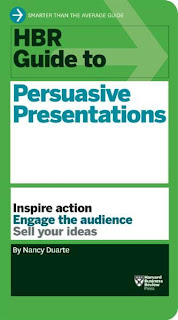
Book Review: HBR Guide to Persuasive Presentations

Image
Harvard Business Review Press has recently launched a book on presentations. It is called 'HBR Guide to Persuasive Presentations' written by Nancy Duarte . I had been planning to read this book when suddenly I received a free review copy of this book last week. I finished it in just two sittings. The book is a very fast read. What does this book contain? This book is a primer on presentations. It touches upon every topic which every presenter needs to know. The book describes the following 7 step process of making any presentation: Know your audience -> Develop your message -> Use storytelling to engage the audience -> Identify the best medium to communicate the message (software or otherwise) -> Design your slides -> Deliver your presentation -> Measure and increase the impact of your presentation. Who is this book for? If you have never read a book on presentations, you should start with this. Since the book has tried to cover everything about a pre...

10 Tips to Reduce Stage Fright (Nervousness)

If presentations make you nervous, here are 10 tips to help you. These tips are from the book 'Speaking Up without Freaking Out' by Matt Abrahams. I reviewed the book in my last post. Many of these 10 tips will apply in your case and help you overcome nervousness. #1  You are not alone Tell yourself that being anxious is normal. Even the most seasoned presenters do get tense and nervous before a presentation. This fear is what makes you prepare well and do a good job. If you are feeling nervous, tell yourself, "This is the way I should be feeling. This is normal." #2 Memorize the first 30 seconds of your talk Your anxiety is maximum at the start of your presentation. You are nervous and worried that you will forget your content. If you memorize the start of your talk then you will surely start confidently and well begun is half done. As you move further, your anxiety will keep coming down. I can personally vouch for this technique since I have used it myself. ...