Posts

Showing posts from August, 2011

How to prepare an Ignite Presentation?

Here is a slideshow I have created which captures the main messages of my longer post on the same topic. Take a look if you too are preparing for your upcoming Ignite presentation. How to prepare an ignite presentation View more presentations from Vivek Singh

10 PowerPoint shortcuts I use most often

Image
I follow Chandoo's blog on excel and his recent post inspired me to write this post. Which are my most used shortcuts in MS PowerPoint? 1. Alt+E+S (Paste Special) If I insert a high resolution (large size) image in a slide, I reduce the image size by copying it and pasting as PNG image. To copy: Ctrl+C. To paste special as PNG: Alt+E+S and choose option PNG. This trick can be used to convert any text/shape/table into an image. Copy it and then paste special as PNG. 2. F2 Click on a text box or shape and press F2 . You can now edit its text. If you are already typing inside the text box, pressing F2 two times lets you select the complete text inside the box. 3. Tab & Shift+Tab When making a list of bullet points, press Tab and you get the second level bullet (a sub point). Pressing Shift+Tab takes the sub point and makes it the main point. It promotes the sub point to the main point. 4. Ctrl+Z Undo the last action. A very effective shortcut which lets ...

It's appleberry time!

Image
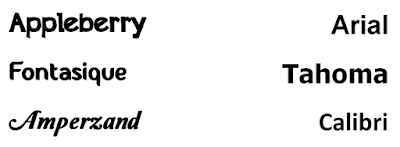
Have we not had enough of Arial, Garamond, Calibri, Times New Roman and Tahoma? How long are we going to use these. The longer we use these fonts, the longer we will look and feel like others. Can we not create our unique identitiy, a differentiator. A new style of presenting. Our style. Try a new font and own it. Use it in presentations and stand out from the crowd. Your audience will like the font and like you as well. I happened to discover and use one such font today. It is called Appleberry and is available for free on dafont.com , an excellent website to download fonts from. This new font gave a completely refreshed feeling to my slides. A real delight! It is a legible, good looking font which can go in presentations (with less text). While browsing I also discovered fonts like Amperzand and Fontastique . Visit the website and discover for yourself. Do give some of these new fonts a try!
The Human Element

Image
Communication cannot be so technical and clinical that we lose the human touch. We are talking to humans and we need to behave like humans. We need to 'connect'. Today I happened to call a company for some information. I was looking for outdoor advertising vendors and landed on this company's website. I called the salesman and here is how the conversation went: Myself: Hello I am Vivek. I am so and so and I want to know if you have hoardings (billboards) in so and so city. Salesman: Yes we do have. Can you tell me how you came to know about us? Myself: Google search Salesman: May I know your name? Myself: Vivek Singh Salesman: Your designation? Myself: MM Salesman: Your contact number? Myself: 9xxxx xxxxx Salesman: Your email id? Myself: Can we talk first? What kind of sites you have and... Salesman: If you give me your email id, I will send all details within 1 hour. Myself: xyz@gmail.com Salesman: Thanks for calling. We will email you the details. I found the communicatio...