Posts

Showing posts from May, 2009

Be a Charts Champion

Image
Charts or Graphs are visual display of information. No presentation is complete without these. There are a lot of decisions you need to make while using charts on your slides. Some of the questions are: Which chart to use? How to make changes in a chart? How to generate complicated charts (bubbles, radars)? How to make it look good? To answer these question and much more, I am starting a series 'Charts Champion' . If you have a query or a tip/experience to share shoot them to me at vivek [at] jazz factory [dot] in.
How to cheat with PowerPoint?

Image
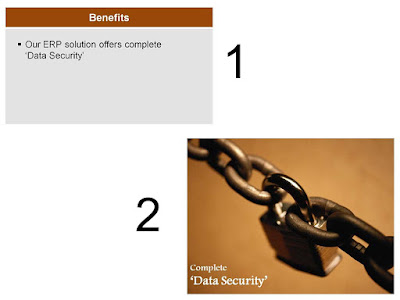
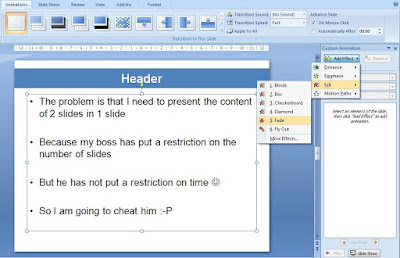
Arvind, a sales manager, has to make a 20 minute presentation in his office and his boss has put a upper cap of 5 slides. Arvind does not feel that he can put all the content in just 5 slides. What should he do? How can he put 10 slides' matter into 5? How can he circumvent the law without breaking it? This was the question I had asked in my May 14 post. A reader Riz Mathani had also given a good reply. In today's post I present one more solution to this problem. How do you cheat with PowerPoint and present the matter of two slides in one? The answer is actually very simple. Use animation. Step - 1 Create the first slide in the normal way. Then animate the placeholder (body). Animation -> Custom Animation -> Add Effect -> Exit -> Fade (in 2007) Under Effect Options -> Text Animation -> As One object You need to do this otherwise each bullet point will fade one after the other. Step - 2 Copy the second slides text onto the first slide. Then animate the plac...

Giving the same presentation again and again

Last week was interesting. I was on a small recruitment spree. We are offering summer projects to MBA 1st year students. Hence I went to 4 colleges and gave a 30 minute talk everyday from Monday to Thursday. I had some 15 slides divided into four areas: Introducing the organization Why a summer project? Summer project details What's in it for you? The first day went well. It was the first presentation. Full of enthusiasm and energy. But before Day 2 I wondered, am I going to present the same thing? This question came back to me before the third and fourth presentation as well. How do you keep your enthusiasm and interest level constant when you are presenting the same thing again and again? I had a recipe ready. I used to change/add one slide everyday. Out of the four parts in my presentation, the most interactive were 'Why a summer project?' and 'What's in it for you?'. To engage the students, I used to ask a lot of questions. Make them think. Also making them ...

What is the ideal font size for a presentation?

Image
Recently I put up a poll on the blog asking readers "What font size they mostly use in ppts?" The answers were very surprising: 40% readers use a font size of 11 to 15, another 28% use 16 to 20. 76% of the readers use a font size of 20 and below. Is 20 and below the ideal font size? What's ideal depends on your medium of delivery: whether you are emailing your presentation or you are going to physically deliver it. If you are emailing, do not go below font size 18 for body text and 26 for header. Remember, the bigger the font the easier it is to read the presentation. If you are delivering the presentation personally on a projector then I advise a minimum font size of 24 for body and 34 for header. What is the role of font size in your presentation? It makes the text easy to read. Remember, the audience member on the back should be able to read the slides without any problem. Knowing how large is your audience will help you decide your font size better. The larger t...

Presentation Zen: Your Road to Presentation Nirvana

Image
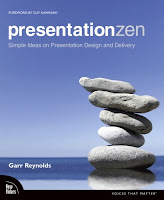
If there was ever a book I wanted to read on the art of presentations, it was Garr Reynolds Presentation Zen. Before sharing with you what Presentation Zen is, I would like to tell you what Presentation Zen is not. It is not a book on MS PowerPoint tips and tricks It is not going to make you a better presenter in 30 days It is not a short-cut to presentation stardom What is Presentation Zen then? It is a new approach to the art of presentations. It is a collection of Garr's wisdom gathered over time. It starts with a realization that something is wrong with presentations today. And after having realized that, you improve by investing time and effort. During my journey through its 225 pages I gathered a lot of wisdom. Some of it I am sharing with you today. If you want more, I strongly recommend you to buy Presentation Zen. Like any great book, the essence of Presentation Zen cannot be drawn from a single reading. Everytime you read it, you will learn something new. The Starting Poi...

Role of Images in Your Presentation

Image
In my May 7 post I talked about the importance of choosing an image which merges with the background color . Today I will talk about the role of images in presentations. You cannot deny that images are being used in most of the presentation today. Be it formal or informal. But why? Why do you use images in your presentations? Think for a second before you read on. 1. To make your presentation look better 2. To break the monotony of text heavy slides 3. Because you like a particular image so you want to put it 4. Because it helps you explain the message better 5. To add humor into the presentation 6. Because you should use images in presentations 7. Because everybody else does it An image is a visual representation (of an object or scene or person or abstraction) produced on a surface (source) . Every slide has a story and every slide should talk about one thing. Given this background, what is the role of an image in your slide? To make it easier for the audience to get the key message...

How many slides for a 30 minute presentation?

I have already answered this question in one of my previous post here ( How many slides should your presentation have? ). Then why am I writing on it again? In the last one month I have seen umpteen number of Google searches for this. There are scores of people out there who are facing this question and so I thought I will nail this issue once and for all. The Question: How many slides for a 30/20/10 or 5 minute presentation? The Answer: It does not matter. Have the right content, say one thing per slide and finish before the allotted time. Do not worry how many slides your presentation runs into. Even if you realize that there is no ideal number there are various reasons which will make you worry about the original question. This is something I want to discuss in today's post. The reasons why you are forced to think on the number of slides? Concern #1: Printing handouts. Lesser number of slides means lesser number of prints. Concern #2: Time management. If I have more slides I...

What Print Ads can teach us about Slide Design?

Image
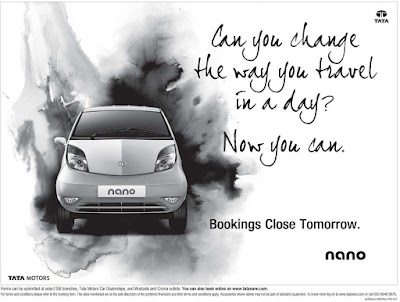
If you like 'designing' your slides, giving them a creative touch, this post will be helpful. Today I will take you through an understanding of how Print Ads get designed and how this understanding will help you design your slides better. This insight is based on my interaction last week with some creative people at RKSwamy BBDO. This post will help you create good visual slides. Visual slides are slides which have a visual appeal and are not the normal text heavy slides. A visual slide mostly has an image with some text. But it can be a text only slide as well. You can make text to look like images. Here is a print ad of Tata Nano (source: agencyfaqs.com ) . Have a look. I am not getting into whether this is a great ad or not. That's not our objective. Let us analyze this ad from a design perspective. This ad has got 3 'elements' ; The image of the car, the words "Can you change the way... Now you can." and the block of words "Bookings Close Tomorrow...

Plan well for your Presentation: The Input - Output Method

Image
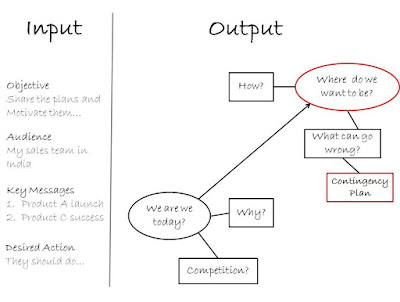
Well begun is half done! This might not be true for the game of cricket (where nothing can be said till the last bowl is bowled) but it surely holds true when it comes to presentations. The fate of your presentation depends on how well you prepare for it. This post is all about preparing the content of your presentation. This stage as 'the Planning stage' of your presentation . As you read the next paragraphs think of the last important presentation you made. How did you prepare then and how you could have done better? Tools: A whiteboard and some color markers Avoid planning your presentation directly in PowerPoint. It will kill time and will never help you plan out the flow well. When I started out as a presenter I used to boast that I get ideas when I sit before the PowerPoint. Later I realized that a whiteboard is more useful for planning. It gives you the big picture and allows greater clarity. Some people use pen and paper for planning. Planning this way might run in...

How to use Images in PowerPoint?

Image
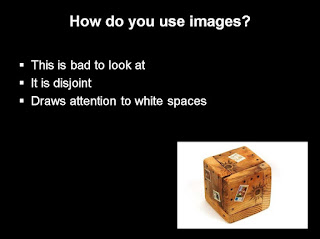
Using images in PowerPoint is a popular thing. Images add life to the content and help the audience visualize the key message. But images come with their own problems. Over the next few weeks I would provide you with simple and effective tips on how to use images in PowerPoint better. Today I will talk of 'Merger'. The image should not be disjoint from the background. You should, as much as possible, merge the image in the background. Why should we do this? Because it looks better. There are multiple ways of 'merging' the image with the background. I share two such tips today. Method #1: Choose the right image If you have a white background then choose an image with a white background. Searching for one might take some more time but the results will be outstanding. See it for yourself. The image above looks out of place because the background of the image is white whereas th e slide has a black background. This image is a big improvement on the earlier one. The only...

Make Good Consult Presentations - Part III

This is the third and final post on "Making Good Consulting Presentations" . As part of the series I have interviewed consultants who are working with large consult companies in India. Young consultants should find these posts really helpful. In today's post I interview Mr. Peri Vishwanath , an IIM Ahmedabad graduate who has worked for 8 years as a Management Consultant. Let us begin. AAP: What is the most important thing in a consult presentation? Peri: Communicate your message sharply. If you are in the early stages of the project and are presenting the problem as you see it, do not go and say "The problem is that sales are low." After having figured out the problem go ahead and define it as sharply as possible. Clarity and sharpness of the message holds the key. AAP: How do you prepare the presentation slides? Do you start by opening the software and typing straight into it? Peri: It is better to prepare on paper first. Most people do this initial stage on ...

Presentation Blogs: A Snapshot

Image
Blogging on presentations is on the rise. Two years back there were only a few blogs on presentations. Today there are many. Year 2008 has seen a surge in the number of blogs on presentations. Out of 15 blogs on my blog roll 8 were started in 2008! Year 2009 looks to continue from where 2008 left. This post has been written with two objectives in mind. 1. To provide you with a list of good blogs on presentations 2. To share with you what each blog talks about Here is the list of 16 blogs on presentations. These are the blogs I follow regularly and this list is by no means exhaustive. These blogs have been arranged in descending order of their age (in months). In column 4 you will find the frequency with which these blogs get updated. If we plot age on horizontal axis and frequency on the vertical axis, this is how the blogs look like: We can clearly group these blogs into three clusters. A. High Frequency New Blogs B. Medium Frequency New Blogs C. Medium/Low Frequency Old Blogs The...

Best of the Month: April '09

All About Presentations has crossed another milestone. Yesterday's post was the 50th post on this blog. Talking of last month let me tell you that I make my own template for every presentation and to encourage you I wrote a post on 'How to create your own template'. Once you start creating your template, you will be able to differentiate your presentation from 90% of others who use dull and boring standard templates. I also started a three part series last month aimed at helping young consultants. Consultants make presentations all the time and this is their output after months of hard work. How they present determines their success/failure as a consultant. The Consult Presentation Series is all about tips and tricks to improve consultancy presentations. There are moments when in real life presentations you might be required to forget the slides and go alone. In those moments you should be willing to do that. My post on April 25 stemmed from a real life case where the prese...