Posts

Showing posts from June, 2009

Dramatize your presentations

My experience teaches me that presentations that are dramatic do well. Before I share with you why, let me define what I mean by drama. Drama would mean creating some curiosity or suspense or humor. Something like a play or a movie. Ideally at the start and only in presentations which are not formal. You cannot dramatize a quarterly review presentation. Can you? This month I gave 3 presentations to a group of 24 interns (if you have been following my blog you would already know I recruited these MBA interns and am getting some work done from them for my company). These 3 presentations were for the weekly review of their performance, collecting feedback and motivating them. Formal situation but required humor and there was a strong need to connect with the interns. To motivate as well as to make them comfortable. The presentations were well received. The measure of success being the active audience participation and the fact that no one dozed off! (the review presentation used to be pos...
Open and edit a .ppsx in MS PowerPoint

Image
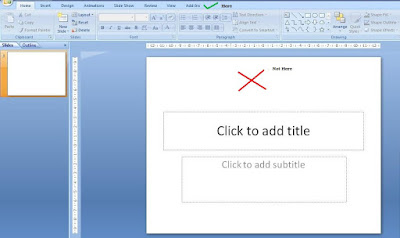
Recently a friend of mine was struggling to open a .ppsx file in MS PowerPoint. He wanted to edit some slides of the presentation but the sender of the file had sent a .ppsx instead of a .pptx. If you have never opened a .ppsx (PowerPoint Show) file in MS PowerPoint 2007 then you might like to read on. The solution is pretty simple. Open MS PowerPoint and then Go to Open --> Choose the .ppsx file. But in his case this was not working for some strange reason. So we solved the problem thus: Step-1 Open MS PowerPoint Step-2 Go to the windows folder where the file has been saved and drag the .ppsx file inside MS PowerPoint Step-3 Drop it on the top (not on the slide) Any faster way than this, drop in a comment.

Which side of the screen do you stand?

When you stand and present which side of the screen do you prefer? Is right, right or is left right? You must have heard people recommending where one should stand. My simple suggestion to you would be: "Do not stand at one place, keep moving." Follow these three things in all your presentations: Stand where you are comfortable, Stand so that you do not come in between the projector and the screen, and Keep moving once in a while, especially to the absolute back row . What happens when you move? The focus shifts to you. As humans we focus on things that move. On a slide, the eyes will go first to that object which is moving/changing. So by moving some bit, you get the audience to look at you and not at the screen. I remember I asked a colleague at work to give a talk for 2 minutes and he stood almost at one corner where no one could see him. And he stood like a statue. The result, no one listened to him. Remember you are more important than the slides. So get yourself into th...

Highlighting a point impromptu in a presentation

Image
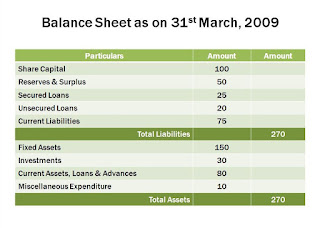
You are presenting the Balance Sheet of the company. This is how your slide looks like. You are making a point about how your Current Assets are just 80 (assume $mn). You feel it is very low and want to draw the attention of the audi ence towards that particular figure on the slide. You had not thought of it while making your slides . But now you feel you should draw the focus towards it. What do you do? Most people do the following: 1. They go towards the slide and point this number using their fingers, or 2. They use a wavering laser pointer to point it out, or 3. They do nothing. Just say, 'Gentlemen focus on the how small our Current Assets have become. Just 80!' Which one do you use when you have to highlight a point on the slides? Think about it before you read on. In case, you had thought of it before then you could have used animated boxes/circles/arrows to appear over/near the figure of $80mn. But how do do the same thing impromptu? You can use the feature called '...

Poll: How template savvy are you?

Most of us use templates for our presentations. Some people like to just use a standard one (already in-built in PowerPoint) whereas some take the pains of finding new templates online. Some even design their own templates. I have put up a poll on the blog (look to your left) trying to find your template using behavior. Do take out 5 seconds and participate. I will share the results after the poll is over.

Yes I am talking to you

I started this blog in January this year and it has been quite a journey for me. Sort of extended my love for presentations to the blogosphere. Have written about a host of topics and there are many more to come. I believe in practical stuff and hence always try to relate everything I say to a real life incident. Over the last five and a half months, have seen quite a decent number of readers on the blog. And so today this post is directed at you. Yes, YOU who is reading this post right now! If you are reading my blog and have been visiting quite often, one thing is clear, that you are interested in presentations. But what more? I would like you to talk to me. Tell me what you like and what are you looking for. What brings you here and what keeps you with me. I want to talk to you, my invisible co-passenger in this journey called 'allaboutpresentations.' Write to me at vivek [at] jazz factory [dot] in or comment on this post.

#2 Be a Charts Champion with Pointy Haired Dilbert

Image
Pointy Haired Dilbert (PHD) is a blog which helps you with Charts and Excel tips. Though you can create charts directly in PowerPoint, many people do create charts in Excel and knowing how to use Excel is always a good skill for a presenter. This blog basically helps you become better at charts. For example, see this link: Create a Dynamic Chart in Excel in 2 minutes: A decent trick which is very easy to create. Also see this or this post; Making Dynamic Charts using Data Filters or this; Compare one value with a set of values . The blog also has a Chart Doctor series wherein you can submit your actual chart (which might not be so good) and they will work on it and make improvements. There is more. Do you want to create Venn Diagrams for presentations? You can learn how to do that here . This was my second post in the series: 'Be a Charts Champion' . If you know of any good resource on Charts and Graphs, leave a comment. And yes, remember to check the Pointy Haired Dilbe...

Tidbits which Connect with the Audience

In my Ju ne 11 post titled 'Early bird catches the worm' I talked about the benefits of reaching early to the venue before a presentation. There I talked about collecting interesting tidbits of information and using it in your presentation. In this post I will write more about what are these 'tidbits of information' and how collecting them will help you connect with the audience better. Around a month back I went to a MBA college to recruit some summer interns. While the projector was being set up by the staff of the college I kept looking around the place, the students, the classroom, the play ground outside the window and I made a note of one thing I saw. It was the motto of the college; "Why What How." Written in large fonts on the play ground. During my presentation I was discussing the summer project and I was telling them about the projects' objectives. I wanted to know 'why something was happening, what should we do about it and how.' ...

It's contest time folks

Image
If you are passionate about making presentations and you think you have something special in you its great news. There are three presentation contests currently on. SlideBoom Presentation Contest 2009 Create a Spark PowerPoint Contest Fuze - Tell a story in 30 slides (or less!) Contest The deadlines for these contests are June 21, June 26 and June 15 respectively. There are some great prizes to be won (Fuze is offering $5,000 to the winner) apart from the popularity and the satisfaction. So don't hold yourself back. Send an entry and cross your fingers. A small tip from my side for contestants. Choose a topic which you are passionate and knowledgeable about. Remember to read all the contest rules. Best of luck!

Early bird catches the worm

You are going to make a sales pitch or you are making the final presentation after a month long market research. The stakes are high. How your presentation goes matters to your company and to your career. You are well prepared and ready with a good presentation. What do you do next? You arrive late at the venue and get off to a bad start! Yes. That's whats been happening with many people who make presentations. Being a part of corporate India I get to see many presentations. From prospective business partners, creative and media agencies to market research firms, and the like. What's common to all these presentations is that most of the presenters either reach the venue 5 minutes before or just in time. That's detrimental. If you want to present at 2pm, you need to be at the venue at least by 1.30pm. Reaching early has multiple advantages: 1. You reduce your nervousness by settling down at the place. You get to familiarize with the venue. 2. You can set up the projector and...

TED Talks: The Pinnacle of Presentations

I was exposed to TED talks quite a while back and since then I have shared it with many people. If you like making presentations and you like watching great presentations, TED is the place to be. TED stands for Technology, Entertainment & Design. It is an annual conference where experts from various field come and present their ideas. The videos are available online. Anyone can freely download hundreds of high quality audio/video files. The video files are also available with subtitles. The list of speakers is amazing. Seth Godin, Al Gore, Bill Gates, Malcolm Gladwell and many more speakers who might not be popular in media but are experts in their respective fields. TED talks are not always slideshows. Some are just speeches and some are with slides. Presentations at TED in whatever form are awe-inspiring, informative, jaw dropping and makes me wonder why are they available for free. If you have not seen a TED talk then you must visit the site . Listen to this talk by Hans Roslin...

#1 Be a Charts Champion with Juice Analytics

Image
'Be a Charts Champion' is a series where we will discuss better ways to present charts and graphs. In the first post of this series, I would like to share with you an interesting link which a reader Rishi Behal shared with me a day back. Juice Analytics: Charts Chooser This is a website which helps you in multiple ways: 1. It helps you decide on what kind of chart you should use. You might wish to present a comparison or a distribution. It might be a relationship between variables of just a simple trend. The categories on which Juice Analytics has charts are: Comparison Distribution Compositor Trend Relationship Table 2. Once you decide on a chart type Juice Analytics provides you a ready made excel sheet. You can download the excel sheet which lets you feed in your data and generate the chart automatically. This feature is especially helpful when you don't want to waste time creating a chart. Or you don't know how to create one. Eg. You might want to use a...

Poll: What is you favorite font type for presentations?

I have put up a poll on the blog (you can find it on the top left side). Participate and find out which font is being liked by more people for making presentations. If you have any interesting 'poll idea' shoot them to me at vivek [at] jazz factory [dot] in .

Are audiences sweet-toothed?

Image
If you are giving a presentation to teach a group of people or you are a trainer for executives/managers this post is of great relevance to you. Even if you are none of the two, you should keep your eyes & ears open to what I am going to say next. Audiences are sweet-toothed . Offer them chocolates and keep them hooked on. It's true! I made a presentation earlier this week to a large audience of 40. Most of them were first year interns who had come to my organization for a summer project. To make the presentation interactive and to avoid anyone sleeping off especially post lunch I went with a bag full of chocolates. Over the four hour animated & lively presentation I managed to get their complete attention through regular (and generous) doses of chocolates. For every great question asked by the audience, there was a chocolate. For every right answer to my questions, there was a chocolate. All in all I distributed some 40 chocolates in just 4 hours! Was it the choco...

Best of the Month: May '09

Last month has been a satisfactory month for me. I started the month with a snapshot of all the major blogs on presentations in the world. Then I went on to write on some of the topics which are very close to my heart. May 9: How to plan well for your presentation? May 12: What presenters can learn from print advertisements? May 16: Role of images in your presentations? I read Presentation Zen very recently and wrote a review as well on the blog. Its a book you must read if you want to learn about presentations. All in all May was a month with lots of content which would have certainly helped you a lot. The most popular posts of May were: How many slides for a 30 minute presentation? How to use images in PowerPoint? Use the Input-Output method to plan your presentations The most read posts till date on the blog are: Sponsorship Proposals: 10 ideas that will get you cash 7 habits of Dr. Stephen Covey Sponsorship Proposals Checklist I would be most happy to hear from you. Sh...