Posts

Showing posts from January, 2010

Are you up for this challenge?

Image
Here is a small challenge I want to throw at you. If you do take it up, share with me the results. If you find any problems with taking it up, do table your concerns. The Challenge: Deliver a Presentation without any text on your slides. You may use pictures, shapes, whatever but no text. The only situation you might not be able to try this is when you are in a formal setting. But explore the various informal talks/presentations you give. Try it out. Why this dare? To improve ourselves as a presenter. - So that we stop using excess text. - So that we stop using text as an anchor to remind us of what to speak. - So that we get complete attention of our audience. So they stop reading the text on the slides and start looking at us and listening to us. - So that we develop confidence by taking complete charge of our presentation. What do you think friend? Are you game? -- Image credit: djcodrin

Keep the lights on while presenting

Image
Every presentation I attend I try to learn something. Some things that have been done right and some things not quite so. The presentation I last attended was a sales pitch from the business development manager of a large enterprise. The presenter was pitching for some business. When I entered the room I saw the presenter standing at one end of the mid-sized rectangular conference room. All lights off. I could only see the bright slides and nothing else. The presenter was at standing near his laptop (he did not have a wireless presenter and so had to stand at one place). He was just not visible. This brings me to the topic of the day: "How should you manage the room lighting while presenting?" Well, the focus of this sales pitch or for that matter any presentation is on the presenter. We have come to listen to him. He is the one who is pitching and asking me to shell out my time and money. So should he hide himself while talking? (unless ofcourse I have come to see a video or...

TED India Talk: Devdutt Pattanaik - Why is India different from the West?

Image
Devdutt Pattanaik is the Chief Belief Officer with the Future Group (Big Bazaar), India. His talk at TED India which took place in Mysore last year is fascinating and exciting. It also answers what the words 'Chief Belief Officer' mean. You must watch his talk (18 mins) here: Devdutt's presentation is on an uncommon topic; linking mythology to business. How is India different from the West? How is Indian business style connected to its mythology? Why the clash of civilisations is imminent and what we can do about it? There is a lot to learn about presentation making from Devdutt's presentation. Here are a few of my observations: 1. Start with a story: Devdutt is well aware that his topic is kind of esoteric. If not made interesting, he will loose his audience half-way. To make the content interesting and understandable he chose to tell us the story of Lord Ganesh and his brother Kartikeya. You need to appreciate that this story helps Devdutt firmly establish his mod...

4 Challenges of Talking to an Audience for the First Time

Image
Few days back I was asked by a popular MBA entrance institute to give a talk to a group of students. This institute prepares students for MBA entrance exams. I was asked to guide them on how to crack Group Discussions (called GDs) which is an essential part of almost every MBA institute's entrance process in India. I had worked with the institute last year on the same thing and so was invited again. So here I was. Talking to a group of 25 students, all of them working with leading software companies. This was my first interaction with them and my task was clear. I had to connect with them right from the start and to share with them all the tips and tricks I had. Talking to an audience for the first time is a challenge. There are 4 challenges you need to overcome as a speaker. 1. How to connect with the audience from the very start? 2. How to make a good first impression? 3. How to understand and know more about the audience? 4. How to establish credibility so that the audience lis...

Download free PowerPoint Templates

Image
On Friday my old friend Sid called. He was going to make a presentation to a bunch of sales guys about Mutual funds and he was looking for a suitable template. If you type 'free powerpoint templates' you will get 5.92 million results on Google and 6.09 million on Bing. But searching on Google might take some time. That's because you are looking for a specific template. In such cases, all you need to do is prioritise. What you should do is find out 2 or 3 good websites which provide free templates. Then go and search these sites instead of wandering around on Google. On of my favourite sites to download PowerPoint templates has been 'MS Office Online' . I used to use this site back in college days. In the last few years I have never downloaded a template. There are two ways to visit the site. You can bookmark the URL and access from your browser. If you forget the URL you need not worry. The link is part of MS PowerPoint. In Office 2007 Open a presentation -> Go t...

1st Anniversary of the Blog

Image
Image: Salvatore Vuono I am very happy to share with you that our blog 'All About Presentations' has completed one year of existence. It was on January 14th last year that I started off the blog. I started the blog with two objectives: 1. Learn more about making presentations, and 2. Share all my learnings with you. I have been trying my best to write useful content in simple language. I hope you have enjoyed reading as much as I have enjoyed writing. I would take this opportunity to thank my better half (it was her idea to start this blog) and to all the friends/relatives, readers and fellow bloggers who have commented, shared feedback and encouraged me. As the blog enters its 2nd year, all I would say is: 'Expect more exciting stuff.' Regards, Vivek (aka Poza)

Sharing Presentations Online

Image
How do we share presentations with others online? We email it to them . That is how people have been sharing presentations with me. Recently a reader emailed me a 2MB+ presentation which took quite a lot of time to download. While most people just email the .PPT/.PPTX file to the receiver there are others who c onvert it to PDF to save on size . I consider conversion to PDF a good idea (unless your presentation has animation, because animation will not work in PDF). PDFs look nice and occupy less space. What else can you do to make the sharing easy and viewing experience better? Slideshare . I strongly recommend you open a slideshare account. Having a slideshare account helps you upload files upto 100MB and then share it with others. You have an option of sharing the files only with the people you want to. After uploading you can choose to show the file to 'Only Me' in sharing. This is called Private Sharing, as opposed to Public Sharing. When you share publicly anyone can view...

Create Magic in PowerPoint

Image
Today I am going to share a very interesting trick with you. I read about the basic technique in this post by Jan Schultink. I have added another dimension to the trick to make it more appealing. Learn the trick and then try to use it to amaze your audience at an opportune moment. How to create this effect on PowerPoint? This trick is actually very simple. All you need to do is to check this small presentation which explains all the 6 steps: Power Point Magic Cut Outs View more presentations from Vivek Singh . Now that you know the trick, go out and use it in your presentations. Make them more appealing and thrill the audiences. Best wishes for all your presentations.

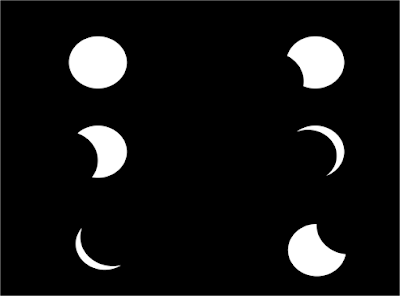
How to create a Lunar Eclipse Effect in PowerPoint?

Image
PowerPoint is an amazing tool. It can do a lot more than what you think it can. There is nothing impossible with PowerPoint. If you have a crazy idea and you think you can't do it on PowerPoint or it is too complicated, think again. While playing with PowerPoint just a while back I got this weird idea. Can we create an Eclipse Effect in PowerPoint? How do we re-create a total lunar eclipse where the Earth casts its shadow over the Moon and gradually eclipses it totally and then moves over. Read to find how to create this 'cool' trick in PowerPoint in just 5 minutes. You can also see screenshots in the presentation below to understand the steps better. For best results, view the presentation in full screen mode. How To Create A Lunar Eclipse Effect In Power Point View more presentations from Vivek Singh . Step-1 You need a blank slide Open a new file in PowerPoint. Right click on the slide panel (on the left) -> Under Layout, choose Office Theme 'Blank...

Avoid The Edges

Image
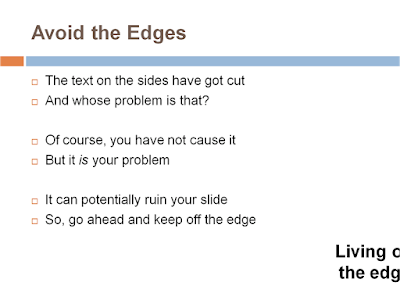
We all want to deliver a successful presentation. But the success of our presentation is not entirely in our hands. It depends on many things. On how you have planned the content, how you have designed the slides and how you deliver the presentation. But even then your presentation can go haywire. And the reason can be as small as 'improper projection'. I don't know about other countries but certainly here in India a lot of times the projector happens to be a presenter's biggest enemy . Ruining the look and feel of the best of slides. One possible problem which I have seen quite often is that the edges of the slides get cut due to adjustment problems. The projection does not fall in sync with the screen on the wall. If you call the IT guy or try your hand and the solution does not come within 5 minutes, stop trying and move on. This is however a 'cure' approach. Curing the problem after it occurs. One simple preemptive solution would be: Avoid text on the edges...

Best of the Month: December 09

Dear friend s December was personally an exciting month for me. I was blessed with a baby boy on December 21 and since then I have been very busy (with work, travel and the baby). The baby and my wife both are doing fine. The new year is here. This new year I plan to bring some 'new' stuff on the blog. But before we launch into 2010 let's just look back at December 09. Like I do every month, in this post I recap the most read posts of the last month and the most read posts on the blog since inception. 6 reasons you should not ask your subordinate to make your slides was the most read post of the month. It has come out from my own experience of making slides which others present. The post highlights problems like loss of meaning, relevance, time management, flow, etc. The next post to this also offers the solutions and talks about how to outsource your presentation . Another post which saw reader interest was on designing a fresh template for your presentation . I read it o...