Posts

Showing posts from February, 2009

Giving Audience the Remote of Your Presentation - Part II
Image
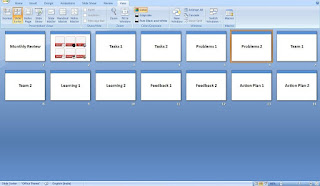
In my last post we discussed a new concept; User-Controlled Presentations. A presentation where the audience decides the content and flow. Let us now see how we make one. Say, the topics or areas you will cover in your presentation are: Tasks Done, Problems, Team, Learning, Feedback & Action Plan. Assuming each topic has two slides this is how your presentation should finally look like in Slide Sorter View: Remember: While you are presenting, you need to come to the dashb oard (slide 2 above) and ask the superior what he wants you to present. You will then choose that topic and start presenting. Once done with that topic, you need to come back to the dashboard. Dashboard Steps in Preparing this Presentation The only two things you need to learn are: 1. How to navigate from the dashboard to the chosen slides 2. How to reach the dashboard after you are done with a topic 1. How to navigate from the dashboard to the chosen slide The dashboard above has been made with sha...

Giving Audience the Remote of Your Presentation - Part I

Image
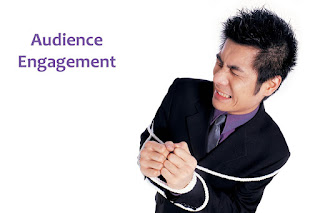
How about putting the audience in the driver's seat? Hand them the remote and let them choose the flow and content of your presentation. It would be the pinnacle of audience engagement, the epitome of customization. What I call "User-Controlled Presentations." A democratic presentation which is of the audience, for the audience & now by the audience . A User-Controlled Presentation (UCP) is where every step is decided by the audience. From what they want to know to the order in which they want to know it. You can use this style in any presentation you make. Some of the cases when I recommend this are: - the topics are so many that you don't know what to keep and what to remove (so you come with everything and let the audience decide), - you want to take the audience by surprise, or - you want to generate interest in a boring presentation How does it work? Let's take an example. A review presentation in office to showcase what you have done in the last month...

When Should I Use Animation?

Once a presenter asked me, "When should I use animation?" It was a presentation where he was proposing a relaxation of rules set by a government agency. I replied, "use it when you make your most important point." I do not recommend much animation in business presentations. Some people think animation is silly and do not use it at all. Some use it so much that it becomes irritating. Point after point made with all kinds of animations. The right choice lies somewhere in the middle. Use it if your presentation needs it. Use it when you make the most important point. How do you decide when to use animation? Animation is a powerful tool. It brings your presentation to life. When slides after slides are static, animation comes in to break the monotony. It draws the attention of the audience and gets your point across very effectively. You should use animation when: 1. You want to draw the audience attention to an important point 2. You want to explain a complicated proce...

Pick of the Week: How Speaking Can Make You Successful

Olivia Mitchell in her post talks about how speaking can enhance your career. Perception is reality, hence a better speaker is considered a better leader and that takes you up the corporate ladder faster. I agree with this. If you talk well and present your ideas better, you will move up in life a lot faster. What should people do then? If you speak less in meetings because you think you might be interrupting / dominating or want to speak only when you can add value, it's time to change. Here are some of the tips she offers to increase what Olivia calls your "speak-up" rate: 1. Let go of perfection in your speech. Talks what comes to mind. 2. Set a goal for how many times you want to talk in a meeting. 3. Support what others say. 4. Don't shy away from interrupting other people. Jan Shultink offers an interesting tip in his blog 'Slides that Stick'. Check out how you can get your point across in a very different manner. You can use this tip to highlight s...

Sweep the Audience Off Their Feet

Image
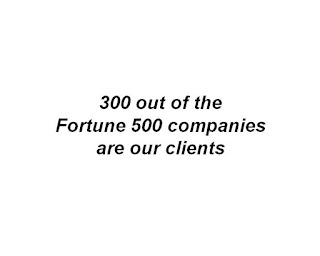
You want to make presentations that will impress people. That will make them say 'wow'. That they will talk about. Then 'make them smile'. They will smile when they see your creativity. When they see a remarkably different way of putting your point across. Trust me, it's not as difficult as it seems. There are many ways to make people smile. In this post I will share one such method with you. It's simple to use and free of cost. Check this example out. You are a software firm making a sales pitch to a client and your slide is on 'why should they choose you'. One of the reasons is: "300 out of the Fortune 500 companies are our clients". Lets see how you say that. Option #1: Plain vanilla style. This is what everyone will do. You can try saying the same thing with a few company logos. Does not highlight your point well. Option#2: You will notice the client is take aback. He is amazed and it shows up in his smile. Option #3: Similar response...

The Most Important Thing in a Presentation

Image
What is the most important thing in a presentation? The content, the delivery or the design (the slides). Have you ever pondered over this question before starting to make a presentation? Let's take an example. You are a business development manager and you are going to present to a prospective client. What's the one most important thing in your presentation? It is not the content, the design or the delivery. Realising what's most important will help you shape up the entire presentation. You would know what to write (content), how to write (design) and how to talk (delivery). If you need to cut excess content, you would know exactly what to chop off. The most important element in every presentation is the objective. For the business development manager, its getting the account, the business. Sounds common sense? It is not as simple as it seems. I often come across presenters who miss the woods for the trees. They miss the bigger picture. They keep worrying about whether t...

Pick of the Week: Mosquitoes & Toastmasters

Mosquitoes from Windows Eric Alberston on slide:ology writes an interesting post on how Bill Gates released a jar full of mosquitoes on his audience while he was presenting to the TED community. A moment the audience will never forget. It is a remarkable trick which Bill has come up with. Read more on this here . Know the Toastmasters Andrew Dlugan in his blog Six Minutes writes on the Toastmasters. It is a not-for-profit organisation spread across the world. The members who join Toastmasters get together once a week or two weeks to make speeches, presentations and improve their communication skills. This is a good way to tackle the fear of public speaking. Read Andrew's informative post here . If you go to the Toastmasters International's website you can find that it is present in 18 cities across India. Hyderabad, where I stay, has 10 clubs whereas Mumbai has 6, Delhi 5, Chennai 10 and Kolkata 3. You can check out a club near you on the website. It is not very big in Ind...

Nervous before Presentations?

Image
Most people get nervous before they make presentations. Talking to an audience creates in us a fear. We start thinking... What if I forget? What if I say something wrong? What if I do a bad job? What if the audience asks a tough question? How does one get rid of this stage fright? By actually attacking the very reasons which breed it. I recommend 4 simple ways to reduce nervousness. 1. Practice Why will you forget what to say if you know everything you have to say? Know your content and rehearse it well. When you know the content, the chances of saying something wrong, or forgetting something get reduced. If you prepare your presentation the night before, chances are you will mess it up. Preparing at the last minute is a recipe for disaster. Worried about what the audience will ask? Prepare for 2 possible questions which can emanate from each of your slides. Be ready with your answers. This will take care of audience questions. 2. Reach Early Your presentation starts at 9am. You reach...

Make Your Presentation Stick

Image
Made to Stick is a must read book for everyone. This powerful book explains why some ideas stick and some are forgotten. Why proverbs are remembered centuries after they were coined, while we forget what our company chairman said in the annual conference yesterday. You need not be in the field of marketing, advertising or communications to benefit from this book. This book will help you every time you are communicating. A m ust read for all those who make a lot of presentations. If you do not get the time to read the book, you can download 'Making Your Presentation Sti ck' from the Made to Stick website . It's free! The authors Chip & Dan Heath have shared some invaluable tips on how everyone can make their presentations better. 5 simple rules for presentation moksha! These are the 5 things the booklet talks about: Download the pdf by registering here for free. Share your experiences after reading and using these tips.

Engage the Audience: what why how (Part 2 of 2)

Image
In Part I we discussed what does engaging the audience mean and why is engagement required. Before we find out how to engage the audience, let us recap what engagement means. get audience attention hold the attention induce involvement which will lead to: understanding & recall (audience remembers what you told them) In Part II we will discuss how to engage your audience when you make a presentation. What should you do to get attention, maintain attention and involve the audience. We can learn from the book Made to Stick which talks about what makes some ideas sticky. The book talks about two emotions; surprise and interest . Surprise gets attention and interest maintains it. To surprise, you need to break a pattern. Unexpected, unpredictable events attract attention. Remember the New Zealand cricket umpire Billy Bowden. Do you think anyone who sees his 'actions' the first time will ever forget him? He does something totally unexpected. So how can you start e...

Engage the Audience: what why how (Part 1 of 2)

Image
Recall the last presentation you attended. What do you remember? What was the topic and what was the core idea? Were you excited during the presentation or waiting for the speaker to finish. If the answer is in the negative, then the presenter was unable to 'engage' you. If you search 'how to engage your audience' Google will throw 1.2million search results in 0.07 seconds flat! But what do you mean by audience engagement during a presentation? understanding? involvement? attention? Are you sure? Think about it before you read on. This two part post is an exploration in audience engagement. In Part I (which is now) we will understand what engagement means and why is it needed? In Part II I will discuss how to engage your audience. So, what is audience engagement? Did you think about it? Most people assume that we all know what 'engagement' means. Yet if you ask 5 people what engagement means to them, you are likely to get atleast 3 different answers. T...

Pick of the Week: Pause & Edit

What do you do immediately after you change a slide in your presentation? What do you do after your PowerPoint is ready? These two questions have been answered during the last week. A week which has seen a lot of activity on presentation and public speaking blogs. So lets get down to the answers. Jerry Weisman , a guest blogger on slide:ology, tells us what we should do immediately after changing a slide . Pause. This is a very simple yet immensely powerful idea. When you read the question, you would have not thought the answers was so simple. Yet how many speakers remember to 'pause'? They keep talking while the audience is busy reading what's on the slides. Olivia Mitchell , author of Speaking about Presenting, takes us through 9 steps of how we can edit a presentation . Very often we finish the PowerPoint in a hurry and do not get enough time to edit it. Following these simple steps will not only help reduce unnecessary content from your presentation, it will al...

Best of the Month: January '09

All About Presentations started in January. Last month I wrote on presentation tips, lessons from real life presenters (Obama & Honda) and a couple of learnings for making sponsorship proposals. Here are the 3 most popular posts of January: Jan 18: 'Yes We Can' learn from Obama (review of LK Advani's website) Jan 25: Honda 'Kicks out the ladder' (learning from the latest Honda corporate video) Jan 14: Checklist for Presentations (a short and useful list for every presenter).

7 Habits of Dr. Stephen Covey

Image
I attended the Knowledge Forum of Dr. Stephen Covey recently in Hyderabad. It was a one day gathering of 500 people so Dr. Covey presented with four large screens in a big hall. There were 7 good things he did which other presenters should learn from. 1. Repeat the important stuff. Dr. Covey did repeat important phrases/statements throughout the speech and kept connecting it back to the core message. This is a good practice for long presentations. 2. Keep inviting questions throughout the presentation. He did not have a question and answer session at the end. It is better to clarify doubts and answer questions on an ongoing basis. 3. Use videos. Since it was a day long presentation using videos keeps the audience attentive and interested. Videos that are relevant, which help explain every important point you make. Before any video was played he also used to mention what was the objective of the video so that the audience knows what to watch out for. 4. Effective use of humor. His spee...