Posts

Showing posts from October, 2009

The Tale of Two Professors

I am lucky to have graduated in commerce from the best college in my city. I had 16 papers in three years. Though my main subjects were accounts, tax and economics my favourite subject was law. Law is obscure and arcane to almost every commerce graduate I have known on this planet. But it was my favourite. Why? There were two professors in my college who used to teach law. One was a maverick middle-aged man and the other was an old man. The maverick prof was Mr. CM Rath. Let's call the old man Mr. Dutta (obviously not his real name). Mr. Dutta used to come to class, start speaking like a radio, students trying to make notes of everything he said. He stopped when the bell rang. He gave 'great' notes which will help you score full marks in the exams. He taught what was 'important' from the exam's point of view. And he taught the same thing year after year. That was his 25th year as professor. Mr. CM Rath , the maverick, never taught from any book. He was a violi...

Dale Carnegie's Tips on Public Speaking

Image
You know about Dale Carnegie . He is famous for his book How to Win Friends and Influence People . He wrote many books in his lifetime. One such book was The Quick and Easy Way to Effective Speaking . I picked it up from my bookshelf one night. My main interest was to know how relevant is Dale Carnegie in today's PowerPoint age. He taught public speaking way back in 1940s but is he relevant today? What does his book have to offer to you and me? Well I skimmed through the book and loved what I read. I am going to summarise some things which I liked and I feel will help you become better at presentations and public speaking. This is not a book review but captures some of the learnings from the book. 1. On Getting Audience Attention Dale Carnegie stresses on the point that you have to 'earn the right to talk' . Hence, you need to know about your subject inside out and be really excited about sharing it with others. If you have earned it, people will listen to you. While ...

Best from Blogosphere: 3 Principles of Communication

Image
Being a presentation blogger I follow a lot of blogs on the subject. I even read stuff on design and marketing. Starting today, I will share with you good posts from all across the blogosphere once every fo rtnight (15 days). I call this feature 'Best from Blogosphere' . Here is the first post. Pro Blogger's Tips on Effective Communication I am a regular reader of ProBlogger . It is a blog for bloggers and is run by Darren Rowse. I came across a post which talks about 3 principles of effective communications for bloggers. The tips are very useful and apply to any sort of communication. As a presenter you will find these 3 principles very meaningful. Darren in his post quotes Brett Rutledge , a public speaker. Brett says, "To communicate clearly you need to do just 3 things: 1. Give me a message 2. Make me care 3. Give me a way to remember it." You can read the complete post here or you can read my explanation (with some value addition) below. Summary When yo...

3 mistakes to avoid in a sales pitch or when seeking sponsorship money

Image
The Context Two senior sales people from a leading TV channel approached me sometime back. They wanted me to sponsor a reality show on their channel. The channel plans to audition 6,000 women across 6 cities in India and then choose 24 of them. These women will then compete against each other and one will emerge as the winner. All of this will be telecasted live on their channel for 4 months. Their presentation (a sales pitch without PowerPoint) begins. Sponsor (that's me): What are you planning to do in the event? Person 1: Sir, here is what we are planning to do. (He hands me a black and white printout of a MS Word document stapled at the top left corner. It's not such a nice looking document given that they are asking for more than 2 million rupees. 2mn Indian Rupees equals $42,500) Person 2: We want you to be our main sponsor for which you will get 8,000 seconds of air time on our TV channel and one 100 sq cm space for an advertisement in our newspaper. Plus you can...

Difference between JPEG, GIF, PNG and BMP? Part 2 of 2

Image
In the last post we looked at various situations where knowledge of file formats will help you make your image look better and manage its file size as well. In today's post we will understand about each file format and its correct use. Understanding File Formats JPG or JPEG - This file format is best for real life photographs. Also preferred when an image has a lot of gradient. JPG is not good for line drawings and text. GIF - GIF is only suitable for text, small icons, cartoons (with minimal amount of colour). GIF distorts the colours present in the image. PNG - PNG as a format came into being as an improvement over GIF. GIF is suitable for text and line drawings but distorts even a small amount of colour. PNG overcomes this problem. You can use PNG for text and line drawings (with or without colours). PNG is better than GIF all the time. It can handle colour very well. BMP - BMP is a very bulky format. The quality of your image will be good but the size will be too big. Refer...

Difference between JPEG, GIF, PNG and BMP? Part 1 of 2

Image
You must be familiar with various image file formats. But are you clear on when you should use which image format? In today's post I will discuss why you need to worry about image file formats. In the next post, I will take you through a complete understanding of each file format. Why bother about file formats? You are not a designer. You do not create images in Adobe Photoshop or Corel Draw. Every time a designer creates a project in Adobe Photoshop he has to decide whether to save the image as a JPEG, GIF or BMP or PNG or some other format. But not you. Even then you need to know about these file formats. Here are some situations which you face regularly where knowledge of file formats will be of immense help. Situation #1 Taking a Screen Shot If you take a screen shot and copy on to MS Paint and save it, by default it will save in .BMP / .DIB . But that might not be the right choice. Your file size and image quality depends on which file format you choose. Hence, you nee...

How to get creative ideas?

Image
Recently I read a post 'How to be creative?' by Scott Schwertly. While I was reading it I started thinking about my own creative journey with presentations. Presentations I had made on campus (IIM Ahmedabad) during my MBA days. They were loved by most people because they were 'creative'. Something they had never seen before. Something which was fun. But how did they become creative? How does one get creative ideas? You don't need to be an artist to get creative ideas. I am not an artist. I believe that everyone is creative. I discovered my creativity through presentations. You might discover it through something else. All that you need is to harness the latent creativity within you. Today's post will tell you how to do that. I will share with you techniques which have helped me generate creative ideas. I am sure they will also help you do the same. Use these techniques for your presentations and see the results. 1. Creativity cannot be forced but it comes...

Teacher & Trainer Special: Interview with Homi Mulla [Part 2 of 2]

Image
Homi Mulla is an OD & HR expert in India. He is known by his flagship Relationship Management Program which he runs for blue chip organizations all the year round. He has worked in the industry for thirteen years and has been training for more than two decades. A musician, a stage actor and a captivating speaker Homi has a lot to teach presenters like you and me. This post will be of special interest to teacher and trainers. This is the second part of the interview. Q7. Don’t you get bored teaching the same thing for the past two decades? Have you ever played Chess? In Chess, no two games are alike. Training for me is like that. Do you think stage actors who do 100 shows of the same play ever get bored. Every show is a new show. I treat myself like a stage actor. My training is like a six-act play. Every time the audience is different and so is the experience. There is no chance of being bored. Q8. Why do you rebuke when someone comes late? Why do you penalize when someone’s mob...

Teacher & Trainer Special: Interview with Homi Mulla [Part 1 of 2]

Image
Homi Mulla is an OD & HR expert in India. He is known by his flagship Relationship Management Program which he runs for blue chip organizations all the year round. He has worked in the industry for thirteen years and has been training for more than two decades. A musician, a stage actor and a captivating speaker Homi has a lot to teach presenters like you and me. This post will be of special interest to teacher and trainers. Q1. You have been conducting workshops for over two decades now. Your workshops last 6 days and go on from 9 to 5. How do you get participants to pay attention? There are two traits of a good speaker; conviction and passion . If you are passionate about what you are doing and you speak with conviction, people will listen to you. When you meet a person with passion you get impressed and begin paying attention. That is the secret of any good speaker. Q2. Your workshops have 12-24 participants. One workshop lasts for 6 days. How do you make sure the audience co...

Need a flag for your presentation?

Image
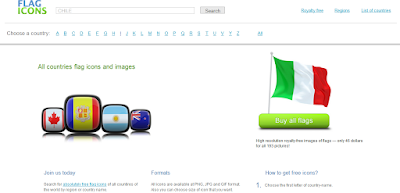
I came across a useful website while reading Troy Chollar's blog . It is called Flag Icons and it provides you free flag icons of various countries in the world. The good news is, its free. You only need to pay if it is for commercial use. So, the next time you need a flag for a presentation all you have to do is: Visit the website Search by country name or by the first letter of the alphabet Choose from the various types of flags Choose your desired quality (64 pixels to 640 pixels) Download the image as PNG, JPG or GIF Note: 1. Transparency - The PNG image will have a transparent background whereas GIF and JPEG will have a white background color. If your slide colour is black then you need to download PNG. If your slide colour is white you can choose any image format. 2. Image quality - The website allows you to choose images from 64 pixels to 640 pixels. Choosing a higher pixel will lead to a higher image size. If you need a bigger image on the slide, download a higher pixel...

The 50% Rule: Reduce excess text from your slide

Image
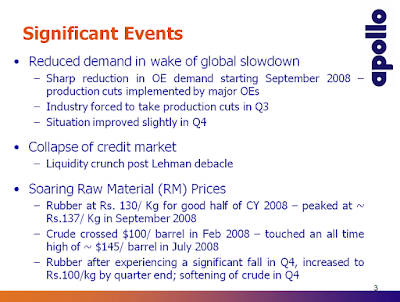
In August I conducted a survey where I asked respondents, "What they hated most in a presentation?" The most hated habit came out to be 'too much text on the slides' . 1 in every 3 respondent was irritated the most by this. You can read the post here . Today we will understand how to overcome this problem. Here is a slide from the presentation of Apollo Tyres. The amount of text on this slide is way beyond acceptable level (word count = 108). What happens when there is too much text on a slide? The audience cannot read all of it, loses interest and loses understanding. They are put off. When you present a slide, they try reading the text. Immediately you also start speaking and in the end they lose out on understanding. A presentation is not supposed to be a word document which has to be read by the audience. If you really want your audience to read so much text, give them a handout (made in MS Word) and keep your slides lean. The reason Why do you have excess words ...

11 things to check just before you begin a presentation

Image
You are in the conference room. Your presentation is about to start in half an hours time. What can you do to ensure there are no last minute issues with your presentation? No embarrassing moments during your presentation. Here is a simple 11 point checklist. You should make a note of these on the back of your diary (or note book) and refer to it every time you are about to make a presentati on. 1. Mobile - Switch off your mobile phone (or put it in silent mode). Your mobile ringing is an insult to your audience. 2. Internet Connection - Switch off internet on your computer (else the outlook messenger will pop up a new email in the middle of your presentation). 3. Equipments - Check if your wireless presenter is working (I recommend you carry spare batteries always). If you are using a microphone, check that too. See whether the projector is working and detecting your computer. You might have to adjust the projection size to your liking. 4. Spell Check - Run a spell check on the p...

How to make award winning presentations?

On August 22, I had talked about a presentation by Dan Roam. He had entered it in the slideshare contest 2009. It was called Healthcare Napkins All . I had analyzed why it was an innovative way of presenting and we had a lot to learn from it. The result of the slideshare contest was announced recently. Dan Roam had won. I was not at all surprised. While browsing through the names of other winners I saw another excellent presentation called Feels Bad On The Back . It is by Mohamad Faried and has won the 3rd prize (out of 3721 entries). You can check it out here: Feels Bad On The Back View more documents from Mohamad Faried . What is required to make an award winning presentation? Mohamad's presentation has been seen by over 3000 people in a month. More than that, it is being liked by people. Shared by people. We will understand how to make an award winning presentation by analyzing Feels Bad On The Back . If you have not seen it, have a look and then read the analysis. 1. T...